Learning Calculator for Kids
A calculator is a tool that helps us calculate numbers quickly and easily. On a computer, we do not need to buy a calculator, because Windows already has a built-in calculator application.
On this page, kids will learn how to use the Windows Calculator (calc.exe) step by step.
- What the Windows Calculator is and how to open it
- Different calculator modes in Windows
- Understanding calculator buttons on a computer
- How to do addition, subtraction, multiplication, and division
- Simple calculation practice using a computer
- Tips for using a calculator correctly
Types of Calculator in Windows
The calculator in Windows (called calc.exe) has many useful modes. Kids can use different calculator types depending on what they want to calculate.
1. Standard Calculator
This is the most common calculator. It is used for basic math such as addition, subtraction, multiplication, and division.
2. Scientific Calculator
Scientific calculator is used for more advanced calculations, such as percentages, square roots, and power numbers.
3. Programmer Calculator
This calculator is used by programmers. It can calculate binary, octal, decimal, and hexadecimal numbers.
4. Date Calculation
Date calculation helps count days between two dates. It is useful to know how many days are left until a birthday or holiday.
5. Converter
The converter helps change values from one unit to another. In Windows Calculator, kids can use many types of converters:
- Currency – convert money between different countries
- Volume – convert volume such as milliliters and liters
- Length – convert length such as meters and kilometers
- Weight and Mass – convert weight such as grams and kilograms
- Temperature – convert temperature such as Celsius and Fahrenheit
- Energy – convert energy units
- Area – convert area such as square meters
- Speed – convert speed such as km/h and m/s
- Time – convert time such as seconds and hours
- Power – convert power units
- Data – convert data such as KB, MB, and GB
- Pressure – convert pressure units
- Angle – convert angles such as degrees
All these converters are available in the Windows Calculator (calc.exe).
In Windows, there is only one calculator called Calculator (calc.exe).
Inside it, there are many smart tools. You do not need to use everything now.
For kids, it is enough to learn:
- Standard Calculator
- Scientific Calculator
When you grow up and learn more math, you can explore other calculator tools step by step.
How to Open Calculator in Windows
Kids can easily open the calculator in Windows. Here are some simple ways:
1. Using the Start Menu
- Click the Start button.
- Type Calculator.
- Click the Calculator app.
2. Using Run Command
- Press Windows + R on the keyboard.
- Type calc.
- Press Enter.
3. Using Search Bar
- Click the search bar on the taskbar.
- Type Calculator.
- Open the calculator.
The Windows Calculator application file name is calc.exe.
Getting to Know Calculator Buttons
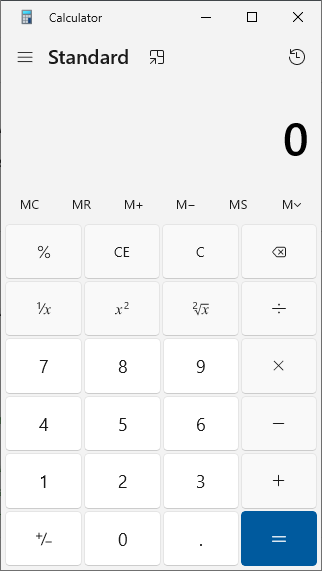
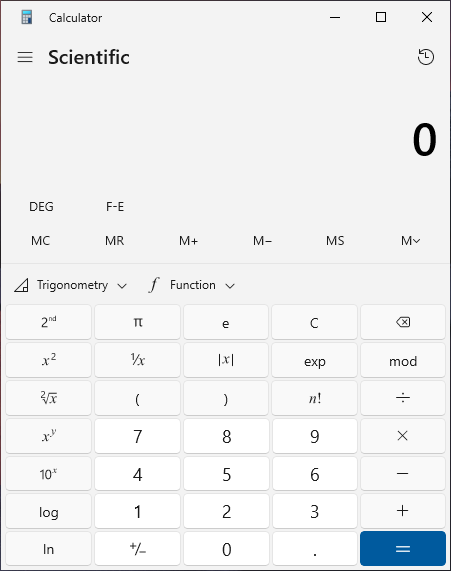
In the Windows Calculator, the buttons you see depend on the calculator mode. Different modes show different buttons.
For kids, the most common modes are Standard and Scientific. These two modes have some buttons that are almost always the same.
Here are the common buttons you can find in Standard and Scientific calculators:
Some important buttons:
- MC – clear the stored number
- MR – recall the stored number
- M+ – add a number to memory
- M- – subtract a number from memory
- MS – store a number in memory
- Numbers 0–9 – to enter numbers
- + – addition
- - – subtraction
- × or * – multiplication
- ÷ or / – division
- = – show the result
- C / AC – clear or reset
Other buttons may appear depending on the calculator mode. You do not need to learn all of them now. Start with the basic buttons first.
Try Simple Calculations
The calculator used in this section is a simple simulation. It is not the real Windows Calculator, but a learning tool made to help kids understand how calculator buttons work.
This kind of calculator can be created by us for learning purposes. It has basic features only, such as numbers and simple math operations.
By using this simple calculator, kids can practice step by step before using the full calculator in Windows.
Try Using a Calculator
Kids can practice using a simple calculator below. Type numbers and click the buttons to see the result.
If kids want to try more features and use the calculator fully, they can open the Windows Calculator directly, as explained in the How to Open Calculator section.
Try these exercises on a calculator:
- 7 + 5 = ? → Result: 12
- 15 - 9 = ? → Result: 6
- 4 x 6 = ? → Result: 24
- 20 ÷ 5 = ? → Result: 4
This calculator follows real math rules. Some calculations use brackets ( ) and special order.
Don’t worry if the result looks different. For now, try simple calculations like:
7 + 5, 10 − 3, 4 × 6, or 20 ÷ 5.
Tips for Using a Calculator
- Read the question carefully before typing numbers
- Check the result if needed
- Use calculators to help, but still practice manual counting
Frequently Asked Questions
What is a calculator?
A calculator is a tool used to help calculate numbers quickly and easily.
Is a calculator good for kids?
Yes. A calculator helps kids understand numbers, but they should still learn basic math skills.
What can kids learn from a calculator?
Kids can learn addition, subtraction, multiplication, and division.
Can kids use calculators on computers?
Yes. Computers and smartphones also have calculator applications.
✨ Want to Learn Math in Documents?
After using a calculator, kids can also learn how to write mathematical equations in Microsoft Word.
➕ Learn Math Equations in WordCreate formulas, symbols, and equations just like in school assignments.
Ready for the Next Challenge?
Now that kids understand calculators, let’s try a physics calculator. This tool helps calculate speed, time, and distance, and more.
Try Physics Calculator