Learn Paint for Beginners
Easy-to-understand basic material to help beginners learn how to draw, create shapes, and use colors with Microsoft Paint.
On this page, we will learn how to use Microsoft Paint to draw, add colors, and be creative on a computer.
This material uses real images and animations so beginners can understand how Microsoft Paint works in practice, not just through icons or symbols.
What Is Paint?
Microsoft Paint is a simple program used for drawing, coloring, and editing pictures. It is suitable for beginners who are learning basic computer skills while being creative.
🤖🎬 Video Illustration Created with AI Assistance
To make the material easier to understand, we use Artificial Intelligence (AI) technology to help create an illustrative video about how to use Microsoft Paint.
This video is not a replacement for the learning material, but serves as additional visual support to help us see examples of opening Paint, drawing with the Brush or Pencil, creating shapes, adding colors, and saving a picture.
🎬 Full Practice Video
Watch the complete Microsoft Paint learning process, from opening Paint, drawing, creating shapes, adding colors, to saving the picture.
How to Open Microsoft Paint
Before we start drawing, we need to open Microsoft Paint. The following method is simple and easy for beginners.
- Click the Start button.
- Type Paint using the keyboard.
- Click Paint in the search results.
- Wait a moment until Microsoft Paint opens.
How to open Microsoft Paint from the Start Menu
💡 Tip: On some versions of Windows, Paint can also be opened by pressing Windows + R, typing mspaint, and then pressing Enter.
Understanding the Main Paint Interface
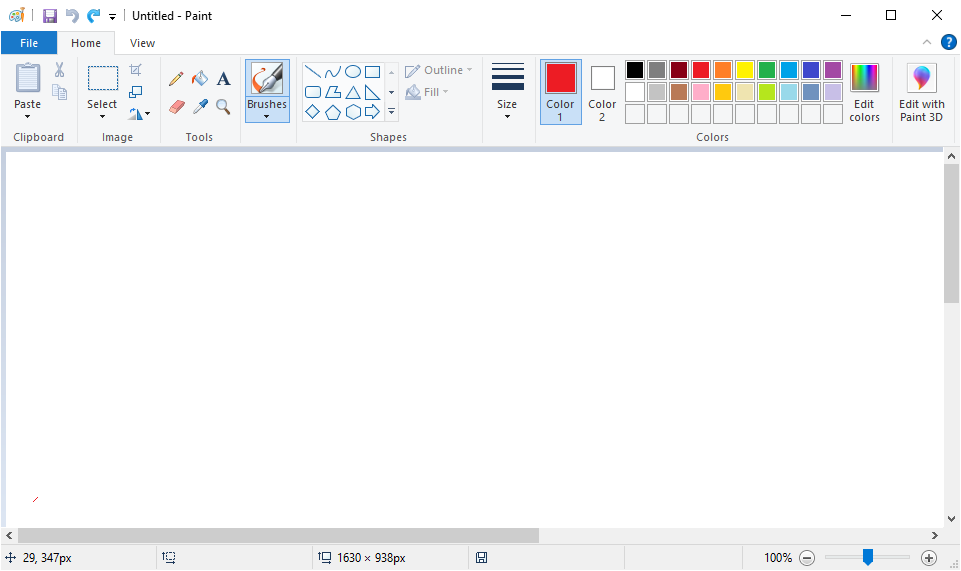
Main Microsoft Paint interface – drawing and coloring area
The image above shows the actual Microsoft Paint interface so beginners can recognize its tools when using the program.
- Title Bar – displays the application and document name.
- Toolbar / Ribbon – contains various tools for drawing and editing pictures.
- Color Palette – used to select colors.
- Canvas – the main area where we draw.
- Status Bar – displays additional information such as image size and view.
Basic Tools in Paint
How to Draw with Brush or Pencil
Brush and Pencil are used for freehand drawing. They are also useful for practicing mouse control.
- Select Brush or Pencil.
- Choose a color from the color palette.
- Adjust the tool size if needed.
- Click and hold the left mouse button on the Canvas.
- Move the mouse to draw.
- Release the mouse button when finished.
Creating Shapes in Paint
Shapes are used to create neat geometric forms, such as rectangles, circles, lines, and other shapes.
- Select Shapes.
- Choose the shape you want to use.
- Choose a suitable color.
- Click and drag on the Canvas to create the shape.
- Release the mouse when the shape looks right.
💡 Brush is useful for freehand drawing, while Shapes help you create more organized forms.
How to Color a Picture in Paint
After creating a picture or shape, we can add colors to make the picture more attractive.
- Choose a color from the Color Palette.
- Select the Fill tool if you want to fill an area.
- Click the area of the picture that you want to color.
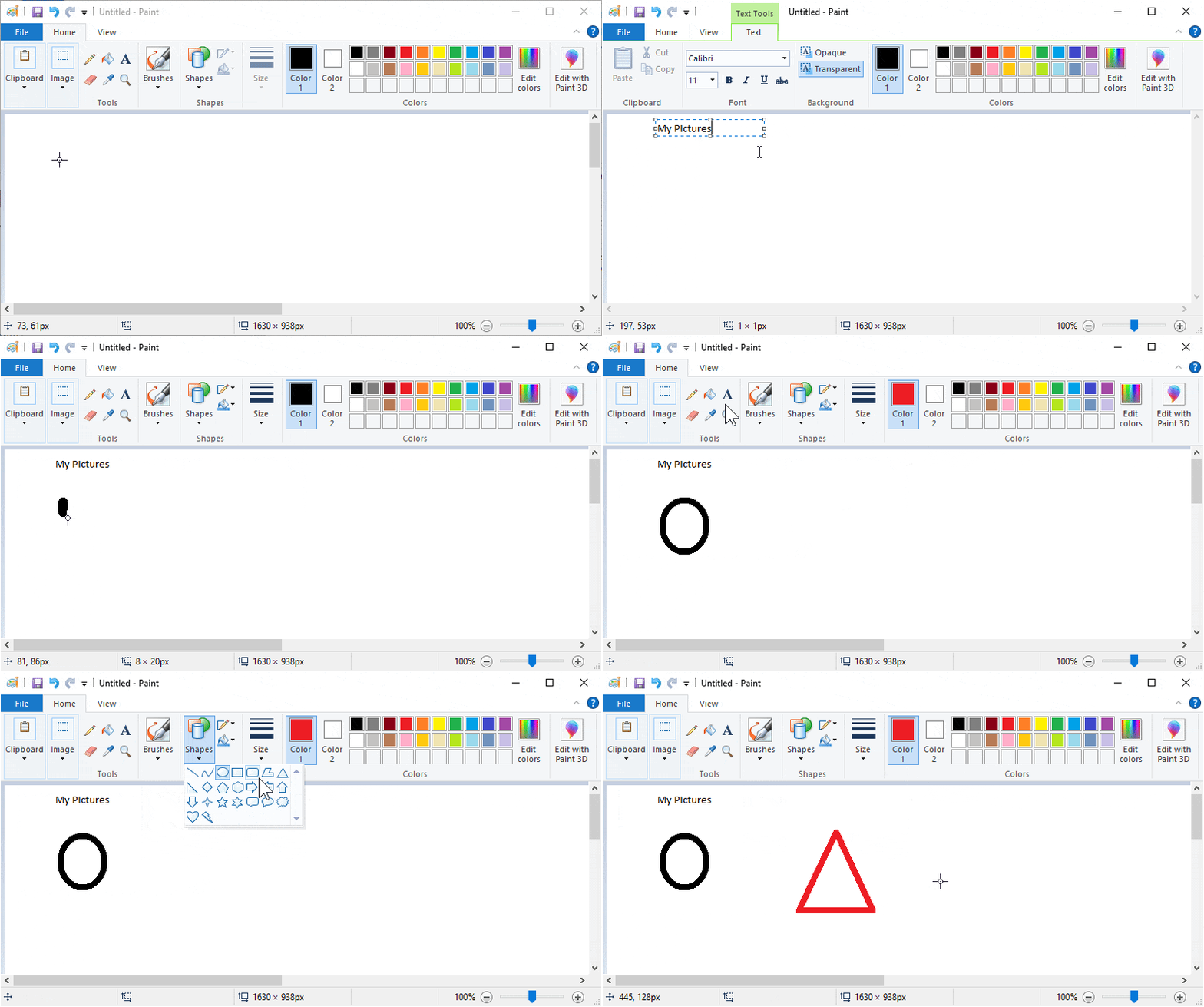
Creating shapes and adding colors in Microsoft Paint
Adding Text to a Picture
Paint can also be used to add text to a picture.
- Select the Text tool.
- Click on the picture area.
- Type the text you want to add.
- Adjust the text size and color if needed.
- Click another area when you have finished typing.
How to Save a Picture in Paint
After finishing a drawing, we need to save our work so the picture will not be lost. In the following example, a mountain picture is saved as mountain.jpg.
💾 Save As
▶️ Click Play to see an example of saving a picture using Save As
In the video above, the mountain picture is saved to Documents → Homeworks with the file name mountain.jpg.
- Click the File menu.
- Select Save As.
- Choose an image format, such as JPEG.
- Choose the folder where you want to save the picture.
- Type the file name.
- Click Save.
💡 After the picture has been saved, you can use Ctrl + S to save further changes.
Why Learn Paint?
Learning Paint is not only about drawing. It also helps beginners practice mouse control, learn about colors, understand basic shapes, and develop creativity.
- ✅ Practice using the mouse
- ✅ Learn about colors
- ✅ Learn basic shapes
- ✅ Improve hand-eye coordination
- ✅ Develop creativity
- ✅ Build confidence when using a computer
Paint is suitable for beginners, people who are new to computers, parents, and teachers who want to introduce basic computer skills.
All examples on this page use the original Microsoft Paint application available on Windows computers.
🎨 Ready to Create More Advanced Designs?
Great! You have learned Microsoft Paint! 👏
Now let's try more advanced tools in
Microsoft Word.
You can add real pictures, create shapes, and make attractive documents!
Make your documents more colorful, creative, and fun!