Monitor
A monitor is a screen used to see pictures, text, videos, and the results of our work on the computer.
Function: displays information from the computer.
A computer has many parts that work together. Some parts are easy to see and use, such as the monitor, keyboard, and mouse. Other parts work inside the computer.
Let's learn about the different parts of a computer and their basic functions! The explanations are kept simple so they are easy for children and beginners to understand.
Computers do not always have the same shape. There are desktop computers, laptops, and tablets. Although they look different, all of them can help us learn and do many kinds of work.
Desktop Computer
Usually includes a monitor, keyboard, mouse, and the main computer unit.
Laptop
The screen, keyboard, touchpad, battery, and other components are built into one device.
Tablet
Uses a touchscreen to display information and receive commands.
Here are some computer parts that we often see and use in everyday activities.
A monitor is a screen used to see pictures, text, videos, and the results of our work on the computer.
Function: displays information from the computer.
A keyboard is used to enter letters, numbers, symbols, and different commands into a computer.
Function: enters data and commands.
How to use a keyboard will be explained further in the Learn Keyboard lesson.
A mouse is used to move the pointer and select things on the computer screen.
Function: helps us control the pointer.
How to use a mouse will be explained further in the How to Use a Mouse lesson.
The processor, or CPU, is the part of the computer that runs and processes commands.
Function: processes commands and data.
The processor is located inside the computer and works together with other components.
Speakers produce sound from the computer. A headset can be used to listen to sound privately.
Function: produces sound.
Volume settings will be explained in the Volume & Sound lesson.
A webcam is a camera used to capture pictures or video, for example during a video call.
Function: captures pictures or video.
Turn off the webcam when it is not being used.
A printer is used to print documents, pictures, or text from a computer onto paper.
Function: produces printed output on paper.
How to print will be explained in the Learn Printing lesson.
Storage is where a computer keeps files and data, such as photos, documents, and school assignments.
Examples: SSD, hard drive, and flash drive.
How to manage files will be explained in the Files & Folders lesson.
Not every computer part can be seen from the outside. Inside a computer, there are several components that work together.
We do not need to study them in detail yet. For now, let's simply learn their names and basic functions.
Processes commands given to the computer.
Helps the computer temporarily store data while a program is being used.
Stores files and data so they can be used again.
The main board that connects different components inside the computer.
In a desktop computer, the power supply helps provide electrical power to the components.
You can learn more about computer hardware in the Computer Hardware tutorial.
A port is a place or connector on a computer used to connect a device. A cable connects the computer to another device or to a power source.
Can be used to connect devices such as keyboards, mice, flash drives, and printers.
Used to connect a computer to a monitor or TV that supports HDMI.
Used to connect audio devices such as headphones or speakers.
Used to connect a computer to a power source or charge a battery, depending on the device.
A computer needs power to work. Laptops use rechargeable batteries, while desktop computers usually receive power from an electrical source through a power supply.
Battery
Stores power in devices such as laptops.
Electricity
Provides power so the computer can work.
Safety
Use electricity and cables safely.
Each computer part has a different job. However, the parts work together so the computer can receive commands, process them, and provide results.
A keyboard or mouse gives commands to the computer.
The processor processes the commands and data it receives.
A monitor, speaker, or printer can provide the result to us.
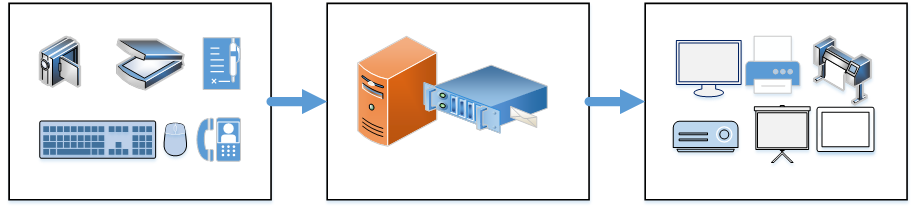
Computer parts work together in the Input → Process → Output process.
To make the lesson easier to visualize, we use Artificial Intelligence (AI) technology to help create an illustrative video about computer parts and how they work together.
This video is not a replacement for the learning material. It is an additional visual aid to help learners better understand what they have just learned.
Let's test your memory! Try to answer the questions below.
Which computer part is used to see pictures and text?
Answer: Monitor
Which computer part is used to enter letters and numbers?
Answer: Keyboard
Is a keyboard an Input or an Output device?
Answer: Input
When we type using a keyboard, the result can appear on the monitor after the computer processes the command.
Keyboard → Processor → Monitor
Now we know the names and basic functions of different computer parts. Next, we will learn how to use one of the most common computer devices: the mouse.
We will learn how to move the pointer, click, double-click, and drag.