Hands-On Lab: Creating an Indonesian–English Dictionary in Excel with VLOOKUP
⏳ Training Duration: 25–40 Minutes
🎯 Level: Beginner – Intermediate
🧠 Learning Method: Hands-on Practice
📦 Material Format: Interactive and Offline-Friendly
📌 Requirements: Basic understanding of Excel tables
🎯 Objective: Participants will be able to create an automatic Indonesian–English dictionary using VLOOKUP and IFERROR functions.
Have you ever wanted to build an automatic translation system in Excel like a real dictionary? With the help of the VLOOKUP function, we can create a simple yet powerful word-search system. When a user types an Indonesian word, Excel will instantly display its English translation automatically.
🌟 Benefits of Creating an Automatic Dictionary in Excel
This exercise is more than just learning Excel formulas. It also trains participants to think like developers building a mini application. Through simple projects like this, learners begin to realize that Excel is not only for calculations, but can also be used to create automated data systems.
-
Develops logical thinking in formula building
Participants learn how formulas work together to search data, return results, and handle errors automatically. -
Encourages building mini applications in Excel
With VLOOKUP, Excel can be transformed into dictionary systems, inventory searches, student databases, and even simple cashier applications. -
Improves attention to detail
Participants become more careful with sheet names, table structures, and column positions to ensure formulas work properly. -
Expands English vocabulary
Since participants enter the dictionary words themselves, they also improve and memorize everyday English vocabulary naturally. -
Introduces basic database concepts
Learners begin to understand how source data connects to search results just like professional applications. -
Boosts creativity in building automated systems
After understanding this concept, participants can develop other ideas such as: computer terminology dictionaries, medicine lists, product codes, or participant search systems. -
Increases confidence in using Excel
Many learners are amazed when Excel can search and display data automatically. This often motivates them to explore more advanced Excel features.
Exercises like this are perfect for introducing computers and Excel to family members, friends, or beginners. The results are instantly visible and feel like creating a real application 😄
📘 What Is VLOOKUP?
VLOOKUP is a function used to search data vertically based on a specific keyword. It is one of the most widely used Excel functions in workplaces because it can handle product searches, student databases, inventory systems, and automatic dictionary projects like this one.
🧠 Main Formula Used
In this exercise, we use the following combination of functions:
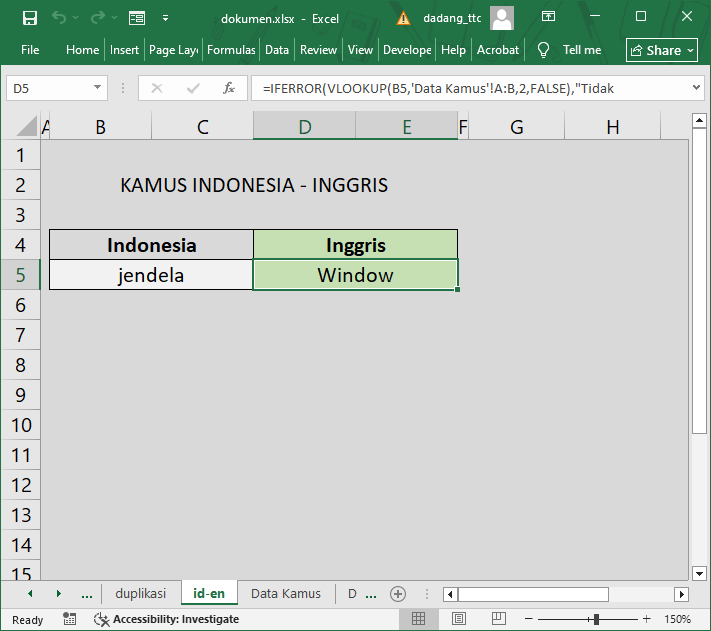
=IFERROR(VLOOKUP(B5,'Dictionary Data'!A:B,2,FALSE),"Not Found")
- VLOOKUP → searches for words in the dictionary table
- IFERROR → displays a message if the word is not found
- FALSE → ensures the search result matches exactly
🧭 Steps to Create the Dictionary Data
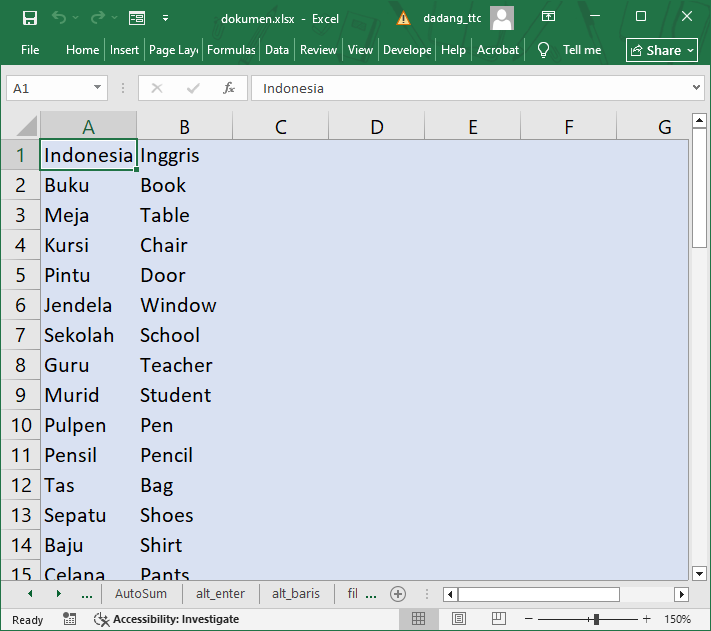
- Create a new sheet named Dictionary Data.
- In column A, enter Indonesian words.
- In column B, enter the English translations.
- Return to the main worksheet.
- Create a search input box.
- Insert the VLOOKUP formula into the result cell.
🧪 Case Study: Automatic Translation
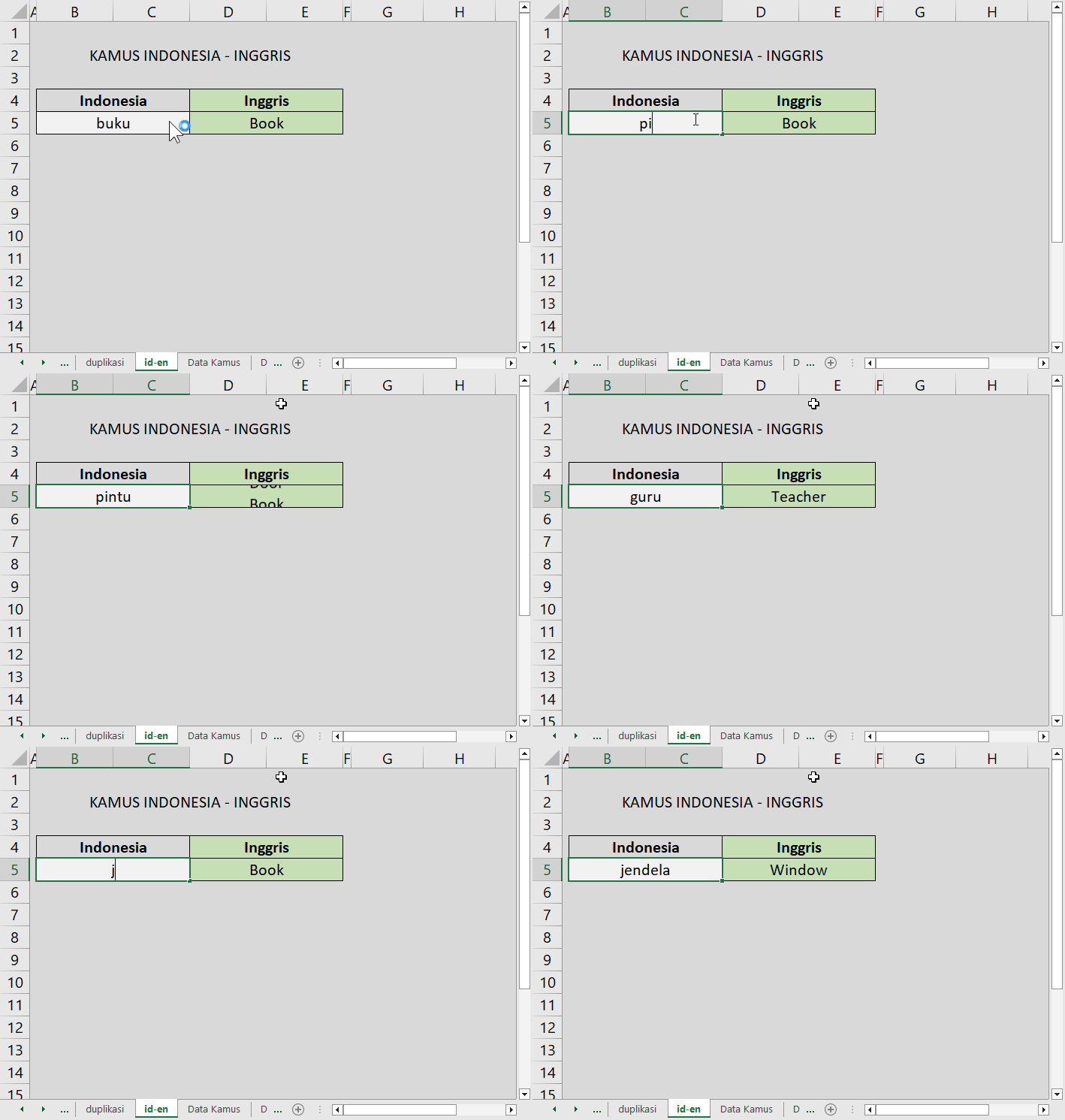
For example, when the user types:
- Pintu → Door
- Guru → Teacher
- Buku → Book
- Jendela → Window
If the word is not available in the dictionary database, Excel will automatically display: "Not Found".
⚠️ Common Mistakes When Using VLOOKUP
- The table range is not locked
- Incorrect sheet name
- The lookup column is not on the far left
- Forgetting to use FALSE
- Incorrect table or range references
🎥 Video Tutorial: Creating an Indonesian–English Dictionary with VLOOKUP
The video above demonstrates how to create an automatic Indonesian–English dictionary in Excel using a combination of VLOOKUP and IFERROR. When a word is typed, Excel instantly searches the prepared dictionary table and displays the matching translation automatically.
🎉 Congratulations! We have successfully created an automatic Indonesian–English dictionary using VLOOKUP and IFERROR in Microsoft Excel.
Through this simple exercise, we learn that Excel is not only for calculations, but can also be used to build automated search systems similar to real applications.
After understanding this concept, it can be expanded into:
- 📦 Product code searches
- 👨🎓 Student databases
- 🏥 Patient records
- 📚 Terminology dictionaries
- 🧾 Other searchable data systems
Keep practicing and experimenting with different Excel formulas. The more you practice, the more advanced your ability to create automated systems in Excel will become 🚀
Want to Learn Excel and Computer Skills for Free?
Explore complete tutorials and join free classes from TTC: