How to Sum Values Based on a Certain Number in Excel
If we want to sum values greater than, less than, or equal to a certain number in Excel, we can use the SUMIF formula. This function allows us to sum data based on specific criteria, whether numeric or text, without manually adding each value.
SUMIF() Function Explanation
The SUMIF() function is used to sum numbers based on specific criteria. It is very useful for calculating totals that meet certain conditions, such as total sales above a certain amount.
Syntax
=SUMIF(range, criteria, [sum_range])
- range: the range of cells to evaluate against the criteria
- criteria: the condition to be met (e.g., ">70", "Store A")
- sum_range (optional): the cells to sum. If omitted, Excel sums range itself.
SUMIF Function Examples
Criteria in SUMIF can be greater than (>), less than (<), equal to (=), or any combination as needed for your calculation.
Sum values in column C greater than 70:
=SUMIF(C3:C9,">70")Sum values in column C if the name in column D is "Toko A":
=SUMIF(D3:D9,"Toko A", C3:C9)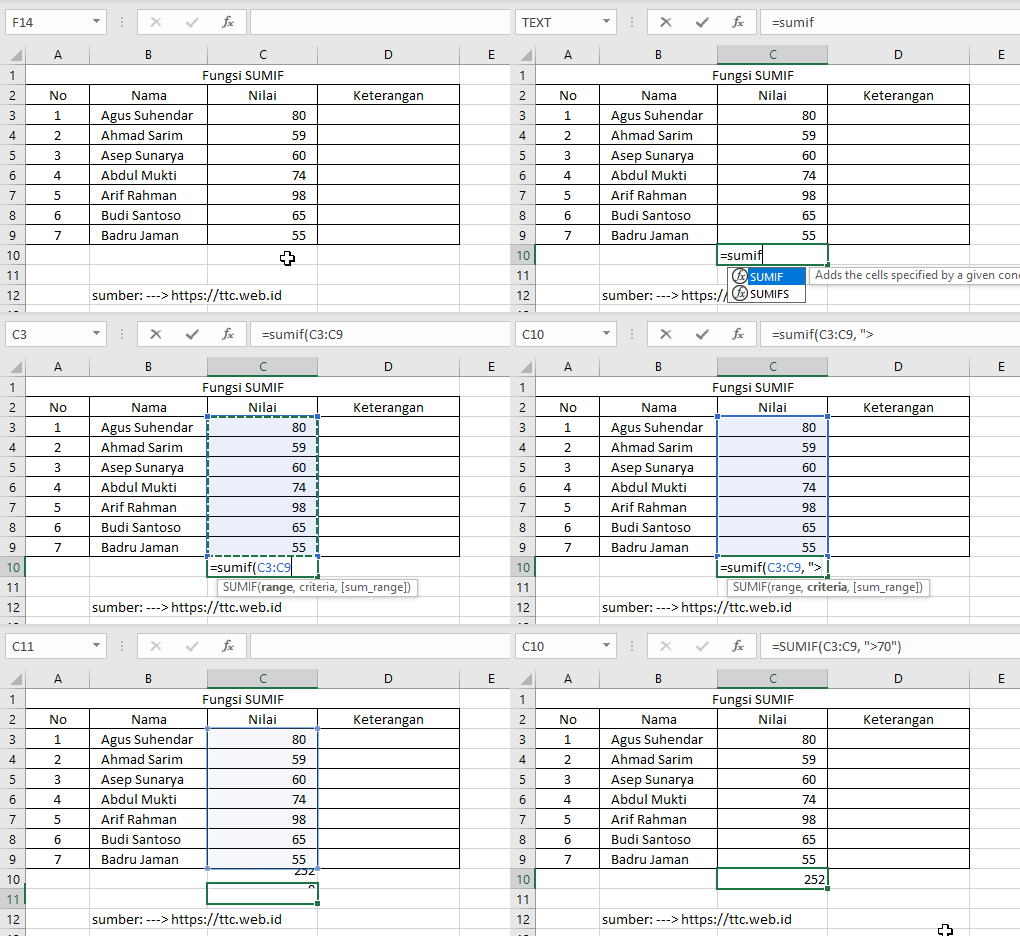
=SUMIF(C3:C9,">70") in Excel.Source: https://ttc.web.id

=SUMIF(C3:C9,">70") in Excel.Source: https://ttc.web.id

=SUMIF(D3:D9,"Toko A", C3:C9) in Excel.Source: https://ttc.web.id

=SUMIF(D3:D9,"Toko A", C3:C9) in Excel.Source: https://ttc.web.id
Understanding how the SUMIF function works allows us to sum data in Excel faster and in a more structured way based on specific criteria. This function is very helpful for daily data processing, especially when working with large datasets with multiple conditions.
Want to learn basic math formulas?
We can use various calculators and math formulas as additional references to understand calculation concepts more easily and practically.
👉 Learn Basic Math Formulas